Message forwarding
Send each new customer message to your own HTTPS endpoint, signed by Avox - the switch, the signing secret and its rotation, test events, retries, auto-pause and the delivery log.
Message forwarding sends each new message your customers send to a WhatsApp number to your own server, as it arrives. Avox signs every request so your server can check it really came from Avox. Everything still shows up in the Inbox as usual - forwarding is an extra copy for your own systems.
Only incoming customer messages are forwarded. Delivery statuses, calls, messages your team sends (from Avox or the WhatsApp Business app), chat history imports, template updates and Flow submissions stay in Avox, where you can see them: statuses and events on Logs, calls on Calls, Flow answers on Flows.
Webhook override#
This section used to be called Webhook Override, and only saved a URL and verify token. It now forwards messages for real, and there's no verify token to manage: Meta's webhook goes to Avox and is checked with Avox's own token. Forwarded requests are authenticated with the signing secret.
You can set forwarding up in two places:
- In the setup wizard - choose Also send messages to my own server on step 2, enter your endpoint, copy the signing secret (shown once) and send a test event. Forwarding switches on by itself when the connection completes, with that same secret.
- On the connection's page afterwards - turn the switch on, as described below.
Who can change it#
Managers see the switch and the Endpoint URL greyed out, with "Only an Admin can change message forwarding." The signing secret is shown only once, to the Admin who creates or rotates it - after that nobody can see it again, not other Admins and not the Avox team.
Find the section#
- Open Connections.
- Click Settings on the connection.
- Scroll to Message forwarding, under Meta identifiers.
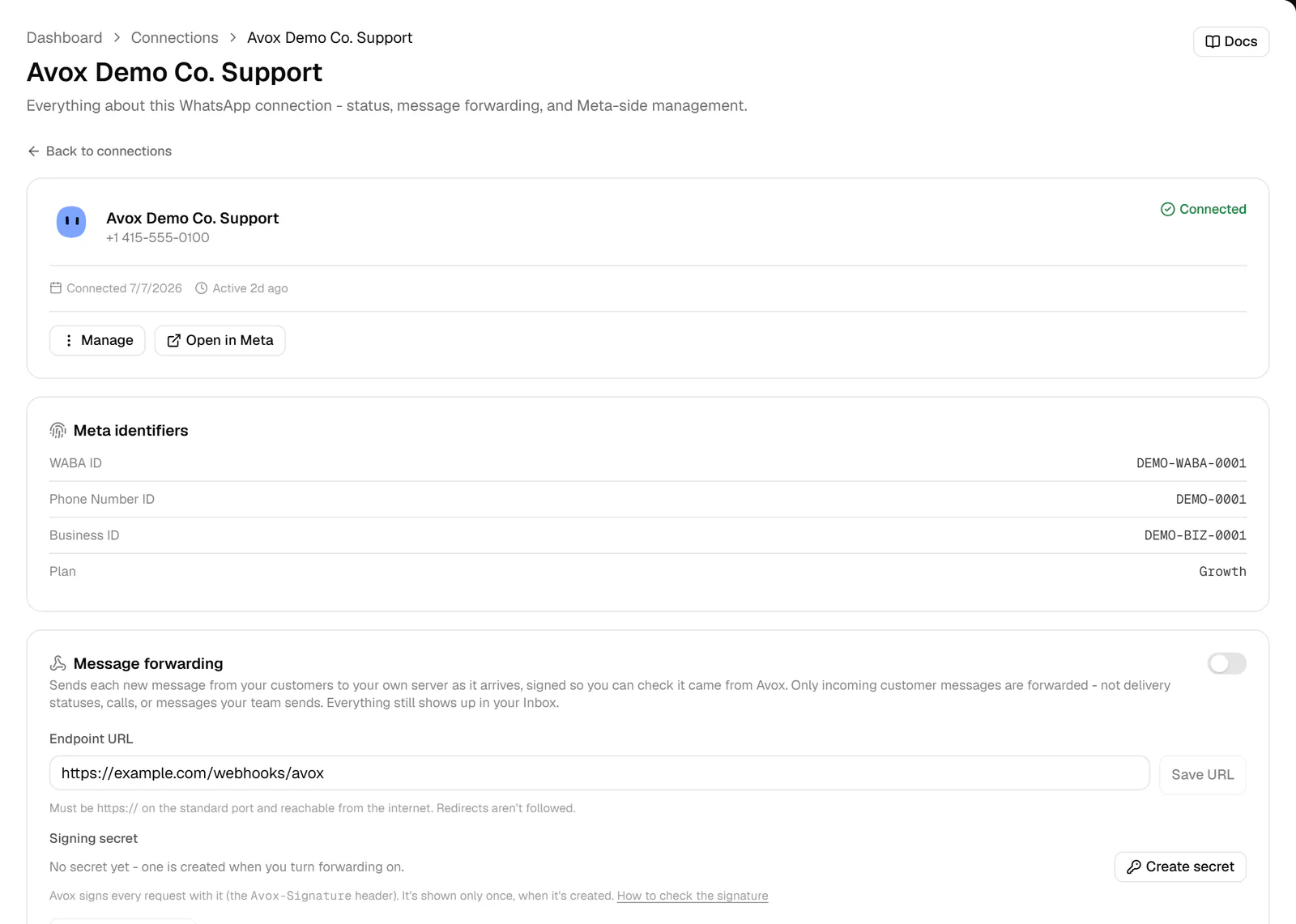
The fields#
Turn it on#
- 1
Build the endpoint
Set up a route on your server that checks the signature and answers
200quickly - see Receive messages for the payload and ready-made code. - 2
Enter the Endpoint URL
Type the
https://address of your endpoint and click Save URL. You see "Endpoint URL saved". - 3
Turn forwarding on
Flip the switch. The first time, the Your signing secret dialog opens: "Copy it now and add it to your server. Avox stores it encrypted and won't show it again." Copy the secret, add it to your server (for example as
AVOX_WEBHOOK_SECRET), then click Done. You see "Message forwarding is on". - 4
Send a test event
Click Send test event. Delivered - your endpoint answered 200 means your server accepted it. Otherwise the message says why, for example "Your endpoint answered 401".
- 5
Check the log
The test shows up under Recent deliveries with a Test badge. From now on each new customer message appears there as it's sent.
Want to check your server before any real message reaches it? Click Create secret, add the secret to your server, and use Send test event. Test events work whether forwarding is on or off, as long as an Endpoint URL and a signing secret exist.
What gets forwarded#
Each new customer message of these types: text, image, audio, video, document, sticker, location, shared contacts, button and list replies, quick-reply buttons from templates, and reactions. Media arrives as Meta's media id with its type and caption, not the file itself. A reply that quotes an earlier message includes the quoted message's id.
Forwarding is how incoming messages reach your own systems as they arrive - an
API key only sends and can't read
anything. (The one other way is an automation's Send to webhook
step, which posts what that step describes to the address you give it.) Each forwarded request is
one message.received event for one message, and holds only these fields:
Only the part that matches data.type is there (text, media, location, contacts,
interactive, button or reaction). Examples for every type are on
Receive messages.
What's never sent#
- Anything from another number or Switchboard. Each event is one message sent to this connection.
- What your team keeps in Avox - replies, notes, tags and categories, contact fields, or anything else about the contact.
- Billing, plan or account details.
- Keys and secrets - no API keys, no signing secret, and never the WhatsApp access token for your number.
- Media files. Only Meta's media id, the file type and the caption travel; download the file from Meta with your own access if you need it.
- WhatsApp's raw payload or your Meta account ids.
What your endpoint must do#
Avox sends a POST with a JSON body and these headers:
A text message looks like this:
{
  "id": "evt_5f0c9a7e1b2d4c6e8f00a1b2c3d4e5f6",
  "type": "message.received",
  "api_version": "2026-10-01",
  "created_at": "2026-10-10T10:00:02.000Z",
  "connection_id": "0b1c2d3e-4f50-4a6b-8c7d-9e0f1a2b3c4d",
  "data": {
    "message_id": "wamid.HBgLMTU1NTEyMzQ1NjcVAgASGBQzQTdGRDA2QzQ1MTk1NkU2NDhCRgA=",
    "from": "+15551234567",
    "contact_name": "Maria Lopez",
    "timestamp": "2026-10-10T10:00:00.000Z",
    "type": "text",
    "text": { "body": "Hi! Is my order on the way?" }
  }
}
The signature is a hex HMAC-SHA256 of <t>.<raw body>, using the whole signing secret (including
whsec_) as the key. For each request:
- Check the signature over the raw body, and refuse anything older than 5 minutes. Accept the
request if any
v1=value matches. - Answer
2xxwithin 10 seconds. Acknowledge first, then do your own work in the background. - Skip repeats. Use
Avox-Event-Id(ordata.message_id) to ignore an event you've already handled.
Every message type, the signature check in Node.js, Next.js, FastAPI and Flask, and the full retry rules are on Receive messages.
Retries and auto-pause#
If your endpoint doesn't answer 2xx within 10 seconds, Avox tries again after about 1 minute,
5 minutes, 30 minutes, 2 hours, 6 hours and 12 hours (a little randomness is added). After the
seventh failed attempt, about 21 hours after the first, the delivery is marked Failed. Redirects
count as failures, because they aren't followed.
If 5 deliveries in a row end up Failed, Avox pauses forwarding for the connection, marks anything still queued as Failed, and emails every Admin once, with the last failure reason and a link to the connection. The section shows an amber notice: "Paused ...: your endpoint failed 5 deliveries in a row, so Avox stopped sending to it and emailed your Admins. Fix your endpoint, send a test event, then turn forwarding back on." (AVX-3104).
To recover:
- Fix your endpoint.
- Click Send test event until it shows Delivered.
- Turn the switch back on.
- Use Resend on any message you missed.
Test events are sent once and never retried, and they never count toward auto-pause.
Rotate the signing secret#
Click Rotate secret. The Rotate the signing secret? dialog explains: "Avox starts signing with a new secret right away. Your current secret keeps working for 24 hours (requests carry both signatures), so you have time to update your server." Click Rotate secret again, then copy the new secret from Your signing secret - it's shown once.
For the next 24 hours each request carries two v1= signatures - one made with the new secret, one
with the old - and the section reads "Your previous secret also works until ...". After 24 hours only
the new secret is used.
Recent deliveries#
The list shows this connection's forwarded messages, newest first, 50 at a time - click Show older deliveries for more, or the refresh button to reload. Each row shows its status, a Test badge for test events, the message id, the time, and a line with the HTTP code, the number of attempts, the next try time and the last error.
Resend (Admins only) appears on Delivered, Retrying and Failed deliveries while forwarding is on. It queues the message again with a fresh set of retries - "Queued - it goes out within a few seconds" - and keeps the same event id, so your server still recognises a repeat.
Deliveries are kept for 30 days, or your Webhook Logs retention on Compliance if that's shorter. With nothing forwarded yet, the list reads "Nothing forwarded yet. Turn forwarding on to start sending new customer messages to your endpoint." (or, once forwarding is on, "...or send a test event.").
Every forwarded message, across all your connections, is also on the Received tab of API logs, with filters, search by message or event id, and CSV export.
Turn it off#
Flip the switch off. You see "Message forwarding is off". New messages stop being forwarded straight away, and anything still queued is marked Failed (you can resend it later). The Endpoint URL and signing secret are kept.
Sending replies#
This section is about incoming messages. To send messages from your server, create an API key and call the Avox API. A key is send-only: it answers each send with its outcome and never returns incoming messages, so forwarding is how they reach your server.
Errors#
Last updated